Simple Audio Mixer
The free Windows application that sets what an iProMOH-V5 plays. Drag in your music and messages, set the mix and the schedule for each channel, and save everything as one content file.
Copy that file to a USB stick, plug it into the player, and the new content is live in seconds. No server, no network and no licence fee — the quickest way to run a single site.
Windows only · 23 MB installer (zip)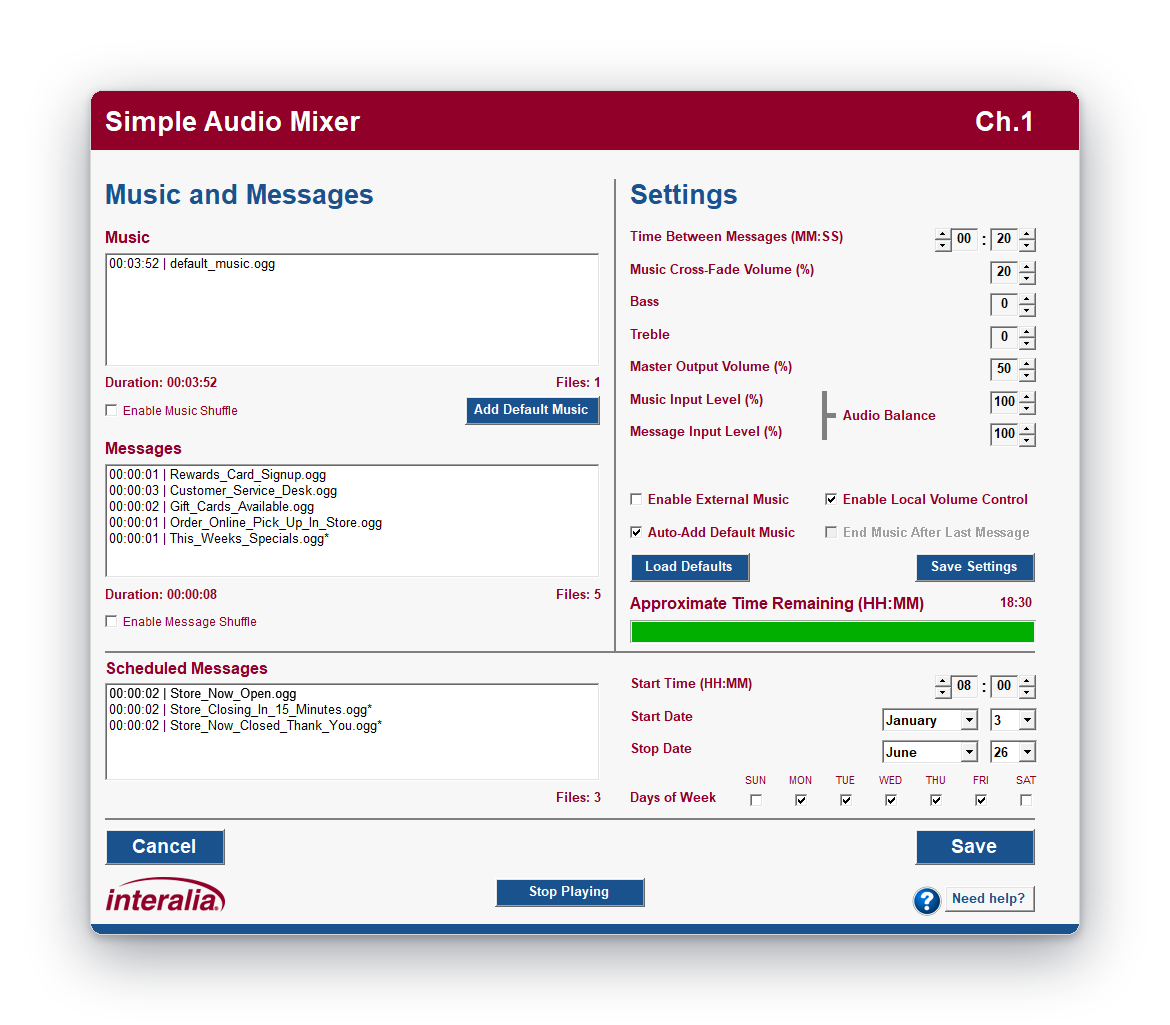 Channel settings screen · click to open full size
Everything the player needs, on one screen.
Drag-and-drop playlists
Drop files straight onto the music or message list, reorder them by dragging, and preview any track with a double-click. Running time and storage left update as you go.
Music and message blending
Set the gap between messages and how far the music dips under each one. Balance music against voice, shuffle either list, or use an external music source instead.
Scheduled messages
Up to ten messages per channel that play at a set time, on chosen days, between start and stop dates — store opening and closing calls, seasonal promotions, holiday hours.
Record your own messages
Record an announcement from any microphone on the PC, play it back, and add it to a list without leaving the application.
Tone and volume per channel
Bass, treble and master output level for each channel. Lock the front-panel volume buttons so nobody on site can change the level.
Media expiry date
Set a date after which the player stops playing the content. Useful for resellers who supply on-hold programs on contract.
From your PC to the player in four steps.
The iProMOH-V5 ships set up for Simple Audio Mixer, so there is nothing to configure on the player before the first load.
Build each channel
Choose iProMOH-SU as the device, then add music, messages and scheduled messages to channel 1 and channel 2.
Set time zone and expiry
Pick the site’s time zone if you use scheduled messages or an expiry date. Plain music and messages don’t need it.
Save the content file
Everything is saved as one .ipc file. Open it again later to make changes, or keep it as a backup of the site’s content.
Load it by USB
Copy the file to the root of a USB stick and plug it into the player. Playback pauses, the content loads, and playback resumes.
Running more than a handful of sites? iMCM pushes content and schedules to every iProMOH-V5 over the network from one server.
The details.
Settings ranges and defaults as they appear in the application.
Scheduled messages and expiry dates need the right time: the iProMOH-V5 sets its clock from an internet time server, so connect it to a network that allows NTP (UDP port 123) and DHCP. Plain music and message playback works without a network.
Music licensing: in North America it is illegal to play commercial music — radio, CD or satellite — on hold without a licence from SOCAN (Canada), or ASCAP, BMI or SESAC (USA). Make sure any music you add in Simple Audio Mixer is licensed for the use.
Download Simple Audio Mixer
Unzip the download and run the installer. To upgrade, close Simple Audio Mixer and install the new version over the old one — your saved settings are kept.
Need a hand with your first content file? Contact support.
Announcement and messaging hardware, designed and built in Canada since 1975.
Vernon, BC V1H 2K54786 1st Ave South, Suite 102
Seattle, WA 981341-800-661-9406